Lead Me On
by WebDept

B2B Lead Generation Software

Lead Me On finds local businesses from map data, scores contact readiness, and lets you draft, send, and track cold-email follow-ups in one workspace.

Core workflow: Discover leads -> qualify signals -> build list -> compose outreach -> send -> follow up.

One Flow from finding prospects to follow-up actions
BYOK AI use your own OpenAI key for AI drafts
Outbound-first built for teams that send real emails daily
Who It Is For

Four clear personas

Lead Gen Agencies

Pain: Team loses time jumping between map search, sheets, and inboxes.

Benefit: One workflow to find, qualify, and send outreach for every client list.

B2B Sales Teams

Pain: SDRs waste time deciding who to contact next.

Benefit: Daily queue shows new leads and follow-ups due with one-click actions.

Freelancers & Consultants

Pain: Prospecting competes with billable delivery work.

Benefit: Faster lead list build and reusable outreach templates reduce admin time.

Early-Stage SaaS Founders

Pain: No dedicated outbound stack or ops person yet.

Benefit: Start outreach without complex CRM setup or expensive data contracts.

How It Works

From lead discovery to follow-up tracking in five steps

1. Search a location

Find businesses by town/postcode and optional category.

2. Qualify quickly

Review website/contact signals and select easy-win prospects.

3. Build your lead list

Import selected leads and keep status/tags in one place.

4. Compose and send

Use templates or AI drafts, then send via connected inbox provider.

5. Work today queue

See follow-ups due, send reminders, and update lead outcomes.

Core Features

Concrete features with practical outcomes

Local Lead Discovery

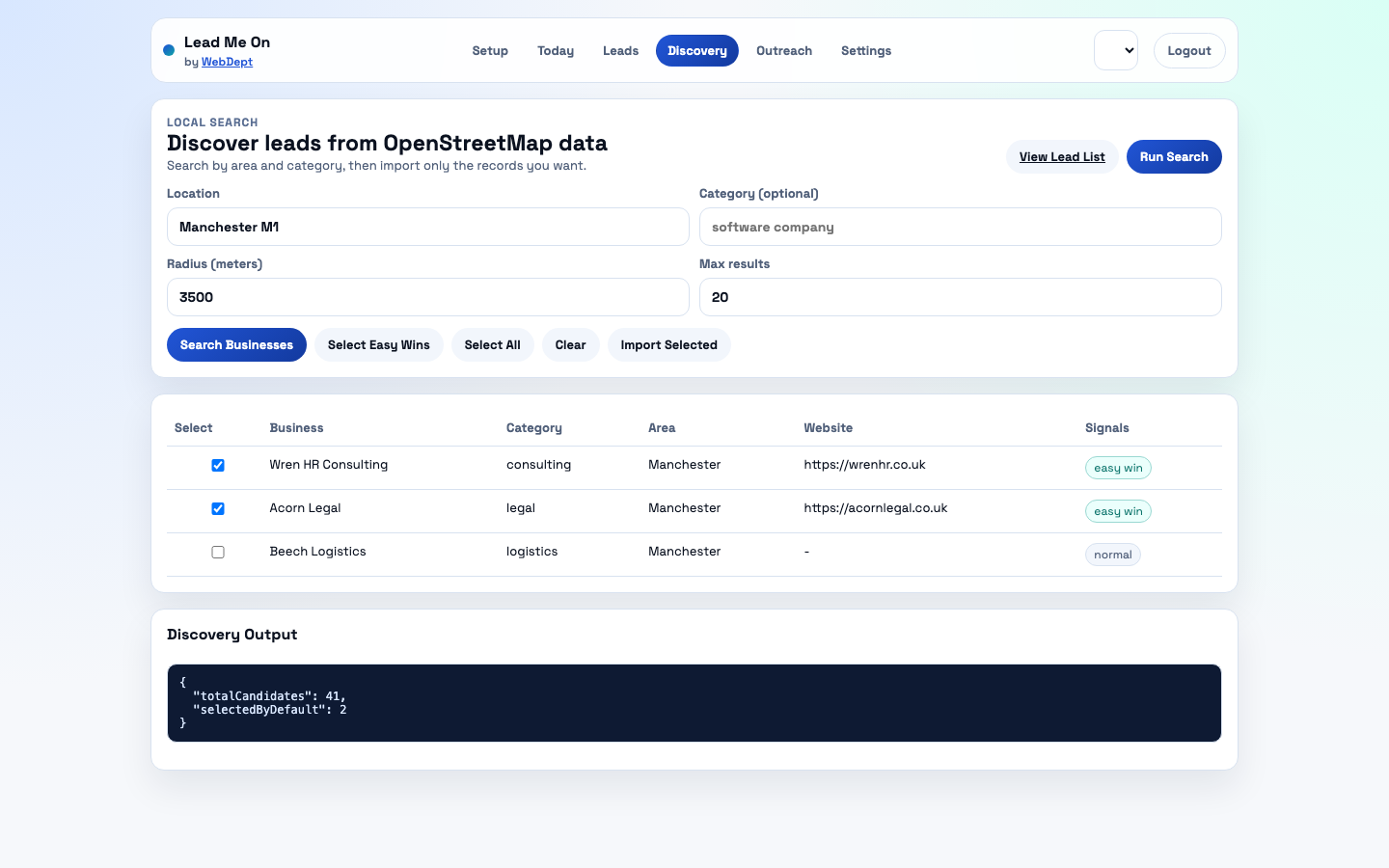
  • What: Search local businesses by area, radius, and category.
  • Who: Agencies and local B2B sellers.
  • Benefit: Replace manual directory research and build first list in minutes.

Qualification Signals

  • What: Automatic website/contact presence and easy-win flags.
  • Who: SDR teams and solo founders.
  • Benefit: Prioritise reachable leads first and reduce low-quality outreach volume.

Lead List Management

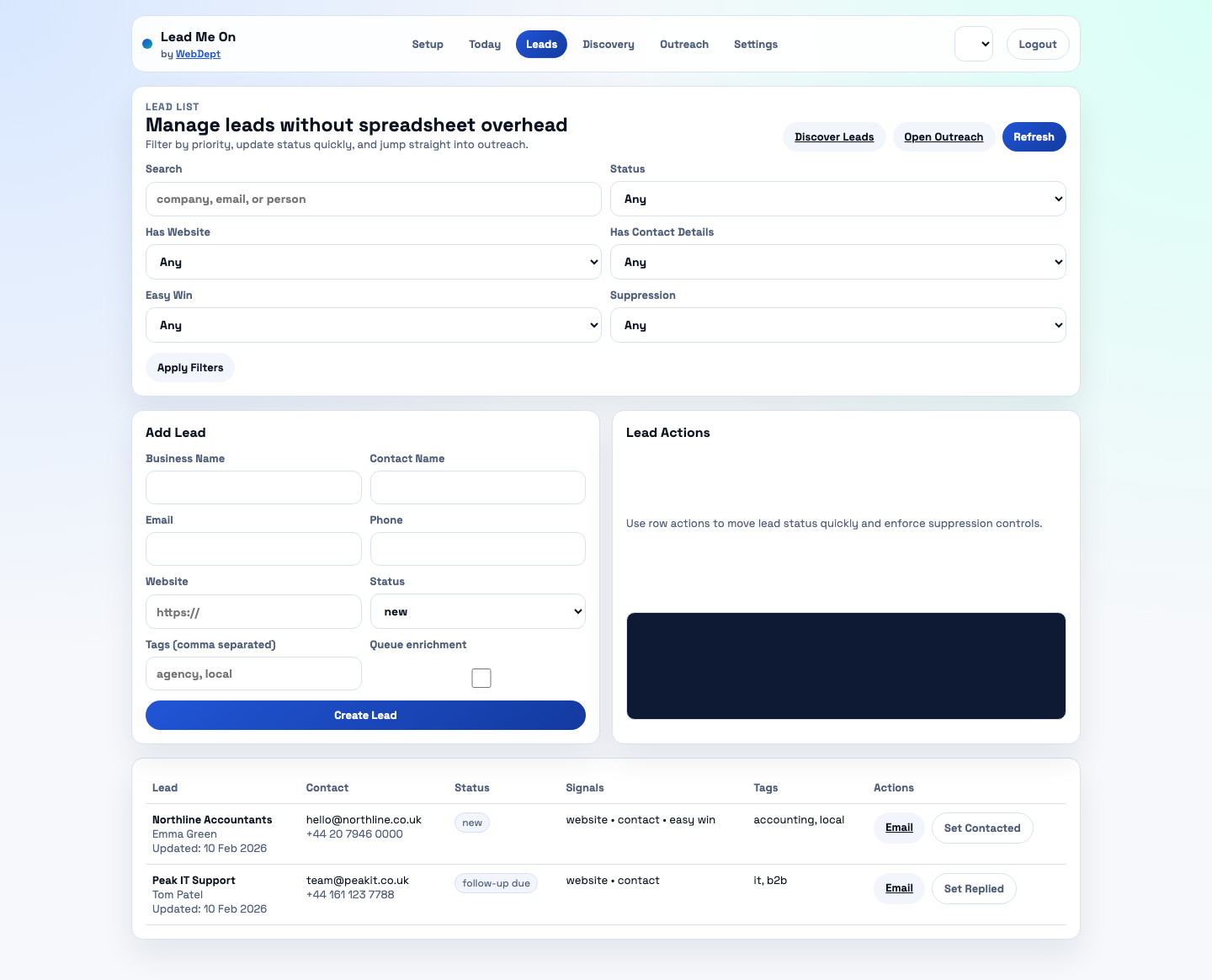
  • What: Statuses, suppression controls, tags, and notes in one list.
  • Who: Teams replacing spreadsheets.
  • Benefit: Clear visibility of pipeline state without CRM complexity.

Outreach Composer

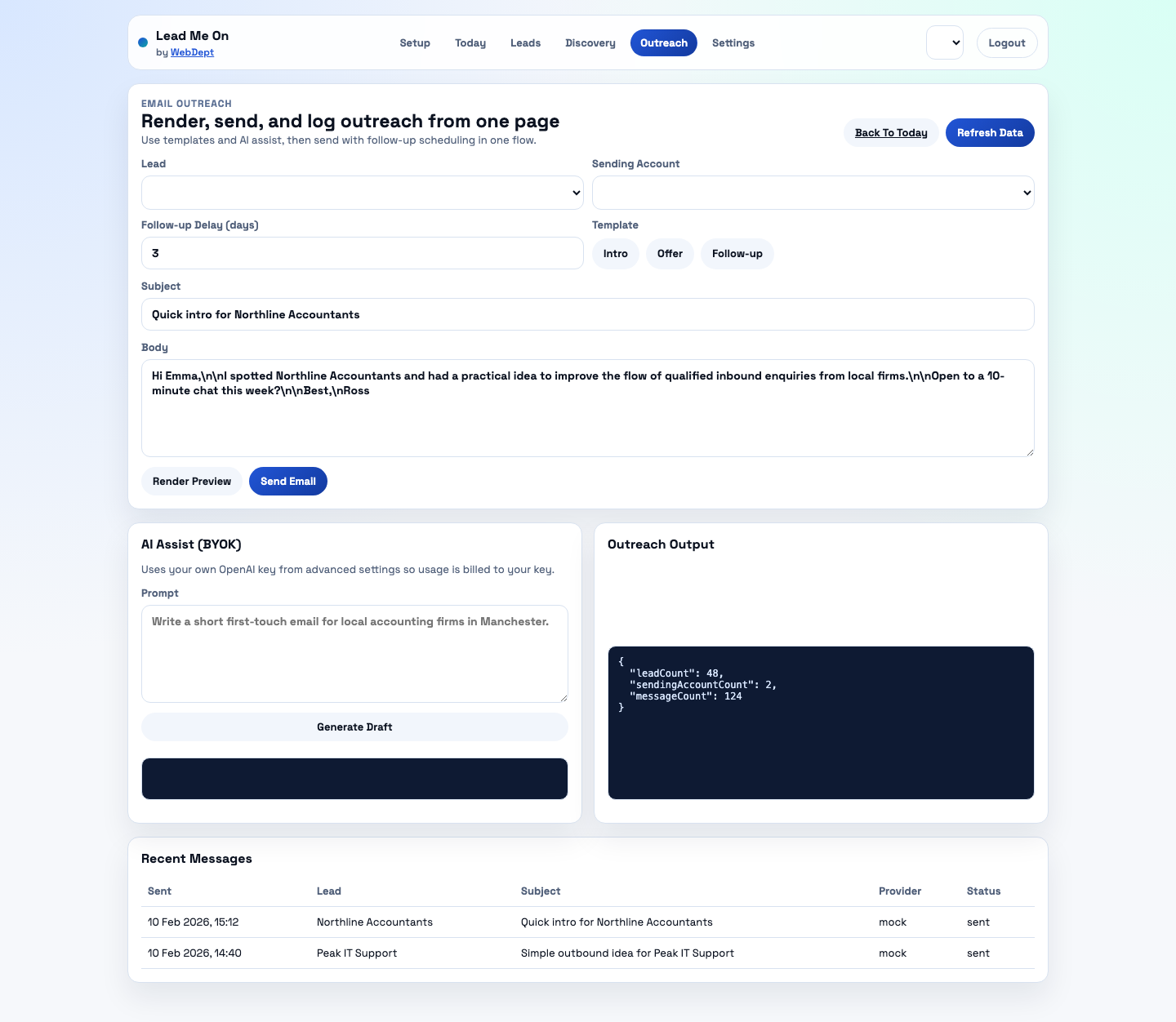
  • What: Template rendering, dynamic placeholders, and send logging.
  • Who: Anyone running cold email campaigns.
  • Benefit: Launch personalised first-touch and follow-up messages faster.

Today Action View

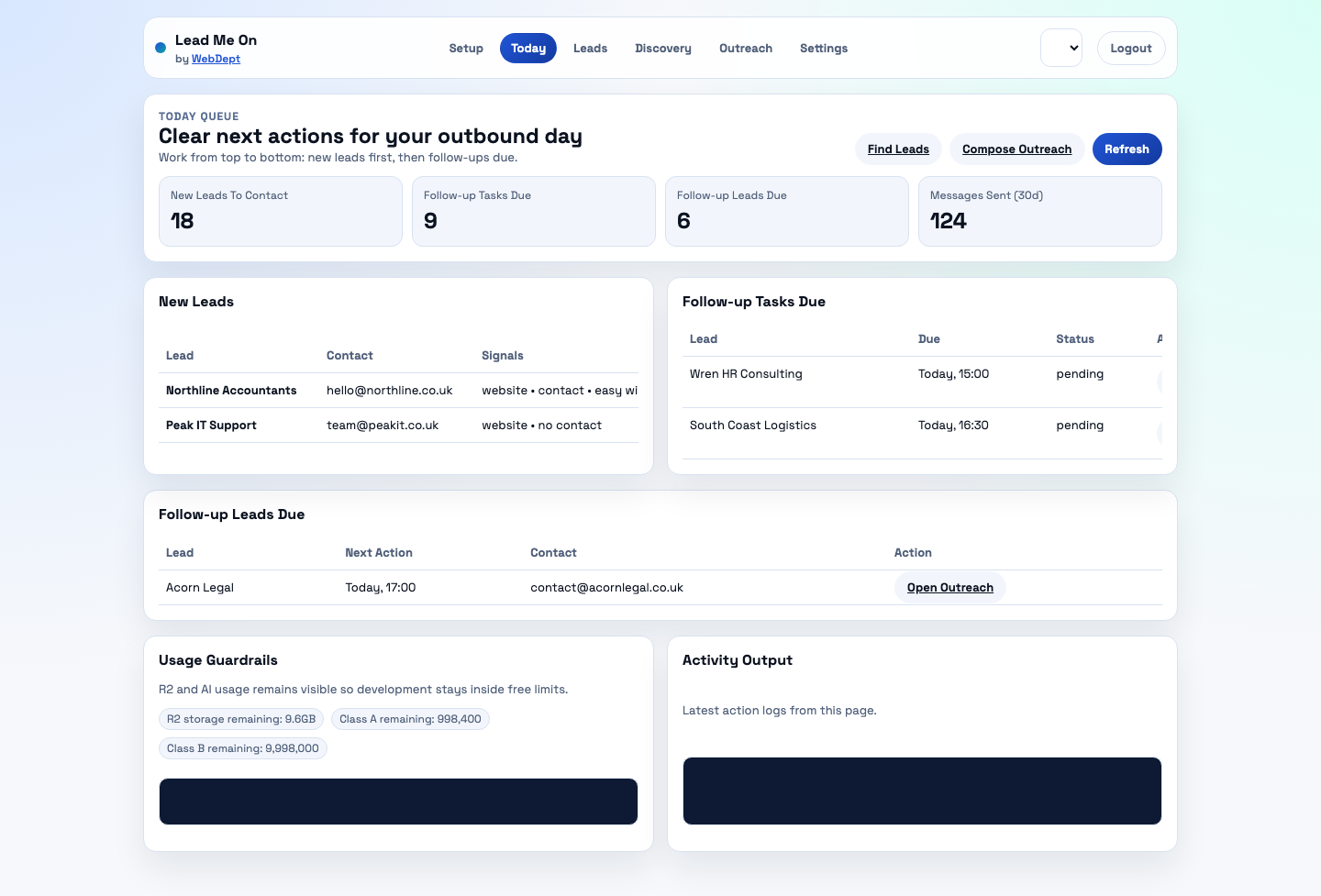
  • What: Unified queue for new leads and follow-ups due today.
  • Who: Busy operators handling outreach daily.
  • Benefit: Lower missed follow-ups and fewer manual reminders.

BYOK AI Drafting

  • What: AI email drafting using your own OpenAI key.
  • Who: Cost-sensitive teams in testing and early revenue stage.
  • Benefit: Keep platform AI cost near zero while still using AI copy support.

Product Visuals

Real screenshots from the current product UI

Example Outputs

Sample lead data, qualification, and outreach copy

Sample Lead Card

{
  "business_name": "Northline Accountants",
  "contact_name": "Emma Green",
  "email": "[email protected]",
  "city": "Manchester",
  "status": "new",
  "tags": ["accounting", "local b2b"]
}

Sample Qualification Signals

{
  "hasWebsite": true,
  "hasContactDetails": true,
  "easyWin": true,
  "priorityReason": "Website + direct email + phone"
}

Outreach Example: Accounting

Subject: Quick intro for Northline Accountants

Hi Emma,
I noticed Northline Accountants and had a practical idea
for generating more qualified local enquiries.
Open to a short 10-minute chat this week?

Outreach Example: IT Services

Subject: Simple outbound idea for Peak IT Support

Hi Tom,
I found Peak IT Support while researching Manchester IT providers.
I can share a concise outbound plan to book more B2B discovery calls.

Outreach Example: Recruitment

Subject: Candidate outreach support for Wren HR

Hi Wren team,
I have a process to help recruiters keep candidate follow-ups consistent
without adding extra admin workload.
Would a short overview help?

Pricing

Simple pricing with a low-cost starting point

Planned paid launch starts from GBP 29/month. During the private beta, access is free.

Beta

GBP 0

  • Core workflow access
  • Local discovery and lead list
  • Outreach composer + follow-up queue
  • Community support

Growth / Agency

from GBP 79/mo

  • Multi-workspace support
  • Team access controls
  • Advanced reporting and exports
  • Priority support

Onboarding Expectations

What happens after request access or sign-up

After sign-up / waitlist

You receive access confirmation, then complete a guided setup wizard.

Typical time-to-value: first lead search in 5-10 minutes, first outreach in 15-30 minutes.

Prerequisites

  • Work email address
  • Optional: sending provider account (Resend, SendGrid, Mailgun, Postmark)
  • Optional: your own OpenAI API key for AI draft generation

Social Proof

Early pilot signals and trusted delivery stack

Example pilot snapshot (internal)

WebDept tested the workflow with a local services list:

  • 50 qualified leads imported in one session
  • First outreach sent in under 40 minutes
  • Follow-up queue generated automatically for next day actions

Trusted stack partners

Cloudflare OpenStreetMap Resend SendGrid Mailgun Postmark OpenAI (BYOK)

Trust & Safety

Privacy-first outbound controls

Data handling and privacy

  • Lead and workflow data stored on Cloudflare-managed services
  • Suppression and do-not-contact statuses enforced in sending flows
  • Designed for GDPR-friendly workflows with consent/suppression controls
  • You can request account/data deletion through support

Security basics

  • Authenticated access to workspace data
  • Provider keys stored as secrets/config, not exposed in UI responses
  • Usage guardrails for storage and operations

Technical architecture details are documented on the Security & Architecture page.

Fit Check

When Lead Me On is a fit (and when it is not)

Good fit if you need

  • Fast local lead sourcing and cold outreach execution
  • A simple daily follow-up operating rhythm
  • Practical outbound tooling without heavy CRM setup

Not ideal if you need

  • A full enterprise CRM with deep opportunity forecasting
  • Mass multi-channel paid ads management
  • Large-scale call-center dialer workflows

Integrations

Available now and coming soon

Email Sending Providers

Available now: Mock, Resend, SendGrid, Mailgun, Postmark.

Exports and CRM Handoff

Available now: CSV export. Native CRM connectors coming soon.

Automation

Webhooks available. Zapier and additional workflow triggers planned.

Resources

Guides and templates for common outbound use cases

Follow-up Playbook

Simple follow-up timing and message framework for higher reply rates.

FAQ

Common questions

How much does Lead Me On cost?

Private beta is free. Paid plans are planned to start from GBP 29/month.

Where does lead data come from?

Current local discovery uses OpenStreetMap/Nominatim/Overpass data plus your own manual and CSV imports.

Are there email sending limits?

Yes. Per-account daily limits and ramp-up settings are available to support safer sending behavior.

How is deliverability handled?

Use warm-up/ramp controls, suppression lists, and health checks. Mock mode is recommended in development.

Do you support integrations?

Email providers are available now. CSV export and webhooks are available. More integrations are on the roadmap.

Can I cancel later?

Yes. When paid plans are live, subscriptions will be cancellable from account settings.

Ready to run outbound with a cleaner workflow?

Request access to the beta and launch your first lead-to-outreach workflow.